If a school network blocks games, there usually isn't a legitimate technical shortcut you should use to get around the restriction. School internet policies commonly prohibit attempts to bypass filtering, and some specifically prohibit using proxies or VPNs to circumvent network security controls.
That does not mean you have no options. If you want to play games during a permitted break, the practical approach is to use games that your school explicitly allows, ask an administrator to approve a particular educational or recreational site, or play on a personal connection when you are allowed to do so.
Why Do Schools Block Games?
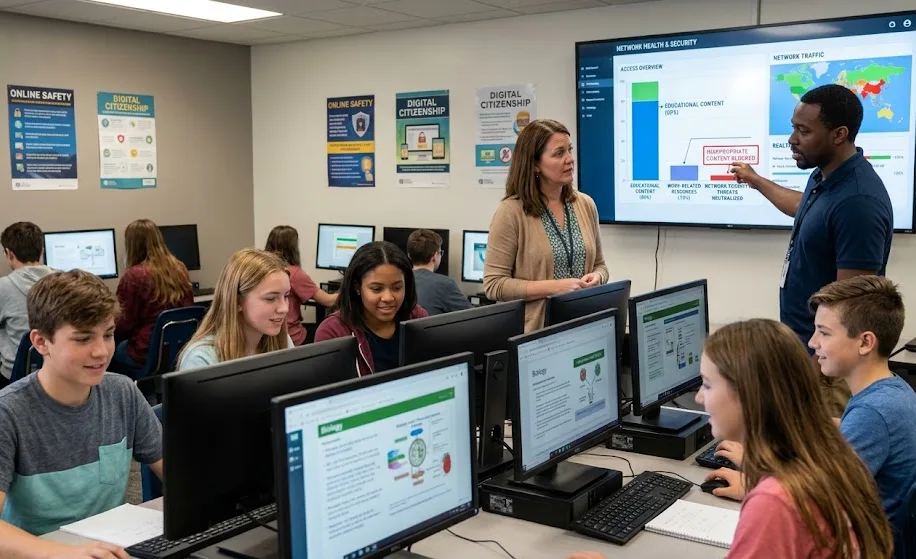
School filters are not generally designed just to stop students from having fun. They are part of a broader system used to control what can be accessed through school-owned networks and devices.
For example, school internet policies can require filtering of inappropriate material and may also restrict websites that are unrelated to educational or work purposes or that could create network-security concerns. New York City's Department of Education policy explicitly says its filtering can cover content considered inappropriate, lacking educational or work-related value, or posing a threat to the network.
Schools may therefore block categories such as:
- Online games
- Gambling websites
- Social media
- Streaming services
- Certain chat platforms
- Adult or inappropriate content
- Websites containing potentially dangerous downloads
- Services that interfere with network security
The exact categories vary between schools and school districts.
Is It Possible to Bypass a School Internet Filter?
Technically, network restrictions can sometimes be circumvented. Common examples discussed online include VPNs, proxy servers, alternate DNS services, and other methods of routing traffic around a network's controls.
However, providing step-by-step instructions for defeating a school's network security would amount to helping someone circumvent an access control they are not authorized to bypass.
That distinction matters. A school network administrator has authority to configure the school's filtering system; a student generally does not have permission to disable or evade those controls.
Some school policies make this explicit. Chicago Public Schools, for example, prohibits attempts to circumvent information-security systems and specifically prohibits using proxy servers or VPNs to bypass network security systems. Virginia's Department of Education likewise identifies circumventing filtering or blocking as something that acceptable-use policies should prohibit.
What Happens If You Try to Get Around the Filter?
The consequences depend entirely on the school's rules.
Possible consequences can include:
- Losing access to a school device or network
- Disciplinary action under the school's acceptable-use policy
- Having an account or device restricted
- Being required to speak with a teacher or administrator
- Creating additional security concerns for the school network
The important point is that "unblocked" does not automatically mean "allowed."
A website might technically load through a particular method while its use still violates the school's technology policy.
Why VPNs and Proxies Are Not a Good School-Network Shortcut
VPNs and proxies are legitimate technologies with many appropriate uses. They can provide privacy, secure remote access, or allow organizations to connect users to internal resources.
The problem is using them specifically to circumvent a school's security controls.
Some school policies explicitly identify VPNs and proxy servers as prohibited bypass methods. Chicago Public Schools, for example, specifically lists both in its student technology policy.
There is also a security consideration. Installing an unfamiliar proxy extension, VPN application, or downloadable "unblocker" simply because it promises access to games can introduce software you do not understand onto a school device.
CISA guidance emphasizes access control, least privilege, secure configurations, and preventing unauthorized access as important security practices.
Safer Ways to Play Games at School
If games are allowed during a particular period, there are several safer approaches.
1. Use Approved Game Websites
The simplest option is to use games that your school has already approved.
Some schools maintain lists of permitted websites or applications. If your school has such a list, use it rather than looking for ways around the filter.
2. Ask for a Website to Be Reviewed
Sometimes a website is blocked because it has been categorized broadly as gaming, even though a particular game may be harmless or educational.
If you believe a site has legitimate educational value, ask your teacher or school's IT administrator whether it can be reviewed or approved.
This is particularly reasonable for:
- Educational games
- Typing games
- Mathematics games
- Language-learning games
- Geography games
- Logic and puzzle games
- Classroom activities
Some school policies allow administrators to make exceptions for legitimate educational purposes. New York City's policy, for example, states that filtering may be disabled for certain users for bona fide research or lawful educational or business purposes.
3. Play on a Personal Connection When Permitted
If your school permits students to use personal devices and mobile data during free time, you can use your own connection rather than attempting to circumvent the school's network.
This still depends on your school's rules. A personal connection does not automatically make gaming during class or on school property permitted.
4. Play Offline Games
Offline games can be a useful alternative when the school's policy permits them.
A game that does not require internet access avoids the particular problem of accessing a blocked website. However, installing software on a school-owned computer may itself be prohibited.
Always check whether you are allowed to install or run software before doing so.
5. Look for Educational Alternatives
If the real goal is simply to have something fun to do during an approved break, consider browser-based activities that the school already permits.
Puzzle games, educational challenges, coding exercises, chess platforms, and other learning-oriented activities may have a better chance of being approved than general gaming sites.
What If a Game Is Blocked by Mistake?
This is one situation where contacting the school's IT department makes sense.
A filter can classify websites according to categories, and a particular site may be blocked even when its content is appropriate for a legitimate school activity.
Instead of attempting to bypass the restriction, report the problem.
Give the administrator:
- The website or game name.
- The reason you need access.
- The class or activity involved, if applicable.
- The exact message displayed when access is blocked.
The administrator can then determine whether the site should remain blocked or be added to an approved category.
What About "Unblocked Games" Websites?
Search results for school unblocked games often lead to websites specifically marketed as places where students can play games on restricted networks.
The word "unblocked" should be treated cautiously.
A site may be technically accessible but still violate the school's acceptable-use policy. It may also contain advertisements, redirects, downloads, browser notifications, or third-party content that the school intentionally blocks.
For that reason, accessibility alone is not a reliable measure of whether a website is safe or permitted.
Can You Use Browser Developer Tools to Bypass a Filter?
Developer tools are legitimate features built into modern browsers. They are useful for web development, debugging, accessibility testing, and learning how websites work.
They are not a legitimate general-purpose method for overriding a network firewall or school web filter.
A browser's developer tools operate primarily within the browser environment. A network-level filter can operate elsewhere in the connection path, such as through DNS filtering, firewalls, secure web gateways, or other network controls.
Trying to manipulate a browser specifically to defeat those controls is also likely to conflict with the school's technology policy.
What About Changing DNS Settings?
Changing DNS settings can be a legitimate troubleshooting technique on a device or network you control.
It should not be used to evade a school administrator's filtering system.
Modern network filtering can involve more than DNS, and attempting to work around one layer may simply trigger another control. More importantly, changing network settings on a school-managed device may itself be prohibited.
CISA recommends strong access controls, network segmentation, monitoring, and controlled configurations as part of secure network management.
Are Free VPNs Safe for School Gaming?
A free VPN should not be treated as a harmless solution simply because it costs nothing.
VPN services differ substantially in how they handle privacy, security, advertising, logging, and software distribution. An unfamiliar VPN or browser extension can also be inappropriate for a school-managed device.
More importantly, using a VPN specifically to bypass a school's network restrictions can violate the school's acceptable-use rules. Chicago Public Schools, for example, expressly prohibits using VPNs or proxy servers to bypass network security systems.
The safer principle is simple: do not install software or alter network settings on a school-managed device unless you are authorized to do so.
What If You Only Want to Play During Lunch?
The answer depends on your school's rules.
Some schools may permit personal device use during lunch or free periods; others may prohibit gaming throughout the school day or restrict access to school-owned devices.
A filter does not necessarily communicate the complete policy. If you are unsure, check your school's acceptable-use policy or ask a teacher.
If gaming is permitted but a particular game is blocked incorrectly, requesting an exception is safer than trying to circumvent the filter.
What Students Should Avoid
Regardless of the game, avoid downloading or installing anything that promises to "unlock" the school network without understanding what it does.
Be especially cautious with:
- Unknown VPN applications
- Proxy browser extensions
- Random executable files
- "Free unblocker" downloads
- Scripts advertised as firewall bypasses
- Websites asking for school account credentials
- Extensions that request excessive browser permissions
- Files from unofficial game mirrors
CISA has repeatedly emphasized the importance of preventing unauthorized access and controlling software execution on networks. Its guidance for K–12 technology also highlights patching, security logging, multifactor authentication, and access controls as important safeguards.
The Better Approach to Blocked Games
If your objective is simply "I want to play a game," there is usually a much easier solution than trying to defeat a school filter.
Use this decision process:
| Situation | Better option |
|---|---|
| Game is approved | Play it according to school rules |
| Educational game is blocked | Ask the teacher or IT department for review |
| Gaming is prohibited | Wait until you are on an allowed network |
| School device blocks installation | Do not install unauthorized software |
| Personal device is allowed | Follow the school's personal-device policy |
| You are unsure about the rules | Check the acceptable-use policy |
This avoids turning a simple gaming question into a network-security or disciplinary problem.
Why School Filters Should Not Be Treated Like a Puzzle to Solve
A school network is an administered environment, not a personal home router. The administrator controls which websites, applications, and services are available for a reason.
CISA's security guidance emphasizes least privilege and controlling access to systems and services.
That does not mean every blocked website is dangerous. Filters can make mistakes, and legitimate educational resources can sometimes be categorized incorrectly. But the appropriate response to an incorrect restriction is to request review rather than secretly defeat the control.
Conclusion
If you are searching for how to bypass a school filter for games, the safest answer is not to defeat the school's network controls. VPNs, proxies, DNS changes, browser tricks, and similar techniques may be technically possible in some environments, but using them to circumvent restrictions can violate school policies and introduce unnecessary security risks.
Instead, use approved games, request that legitimate educational websites be reviewed, play offline when permitted, or use a personal connection when school rules allow it. If a harmless game has been blocked by mistake, your school's IT administrator is the right person to ask for access.
FAQs
Can I bypass my school's Wi-Fi filter to play games?
You should not attempt to circumvent a school network's security controls without authorization. Many school acceptable-use policies explicitly prohibit bypassing filters, and some specifically prohibit VPNs and proxy servers for this purpose.
Is using a VPN to unblock games at school allowed?
That depends on your school's policy, but many schools prohibit using VPNs to bypass network restrictions. Chicago Public Schools, for example, explicitly prohibits using VPNs or proxy servers to bypass network security systems.
What should I do if a legitimate educational game is blocked?
Ask your teacher or IT administrator to review the website. Some school policies allow administrators to make exceptions for legitimate educational purposes.
Are unblocked game websites safe?
Not necessarily. "Unblocked" describes accessibility rather than security. An unfamiliar gaming website may contain intrusive advertising, redirects, unwanted downloads, or other risks.
Can I change DNS to access blocked games?
Changing DNS can be legitimate on a network you control, but using it to evade a school's filtering system is not appropriate without authorization. It may also violate the school's technology policy.
Can browser developer tools remove a school filter?
Generally, browser developer tools are not a substitute for network-level authorization. They are intended for development and debugging rather than bypassing a school's firewall or filtering system.
Can I play games on my own phone at school?
That depends on your school's rules concerning personal devices, internet access, and gaming. A personal device does not automatically make an activity permitted during school hours.
What is the safest way to play games at school?
Use games and websites your school explicitly permits. If an educational or otherwise appropriate game is blocked incorrectly, ask the school's IT staff or teacher to review the restriction rather than attempting to circumvent it.