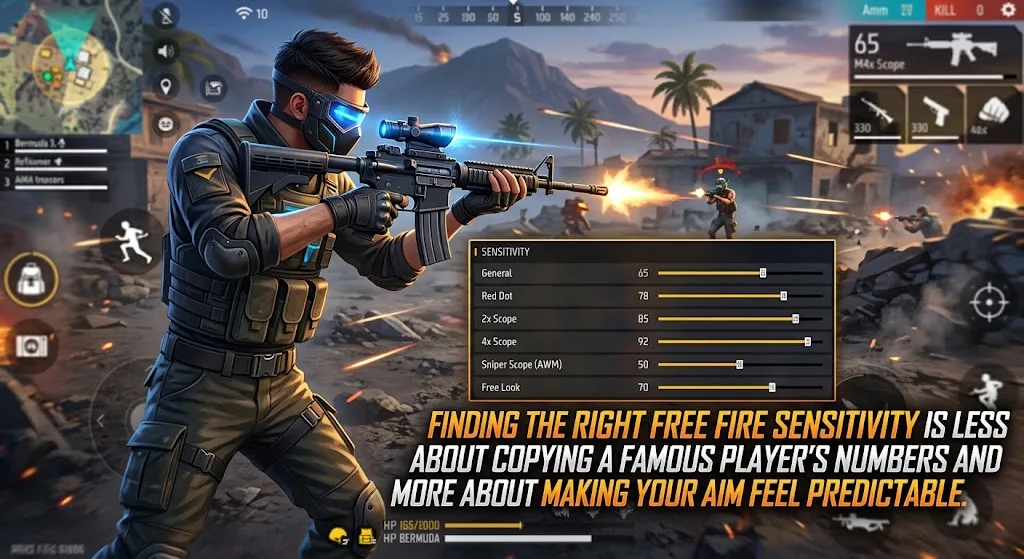
Finding the right Free Fire sensitivity settings is less about copying a famous player's numbers and more about making your aim feel predictable. Garena provides separate sensitivity controls for General, Red Dot, 2x Scope, 4x Scope, AWM/Sniper Scope, and Free Look, so each setting affects a different part of your aiming experience.
One important detail is easy to miss: Garena increased the sensitivity cap to 200, giving players a wider adjustment range. The right values therefore depend on your device, control layout, screen response, and personal aiming style.
Recommended Free Fire Sensitivity Settings
There is no single sensitivity configuration officially designated by Garena as the "best." The following is a starting setup, not an official Garena preset.
| Setting | Starting value |
|---|---|
| General | 180 |
| Red Dot | 170 |
| 2x Scope | 155 |
| 4x Scope | 135 |
| AWM/Sniper Scope | 90 |
| Free Look | 150 |
These values are intended as a practical starting point on the current 0–200 sensitivity range. They should be adjusted rather than treated as universal competitive settings.
Garena's own documentation explains that General controls sensitivity during normal screen movement, Red Dot applies when using the close-range sight, 2x and 4x control their respective scopes, AWM applies to sniper/AWM-type weapons, and Free Look controls the corresponding look-around movement.
What Each Sensitivity Setting Does
General
General sensitivity affects normal camera movement. It is one of the most important settings because it influences how quickly you can move your view before using a scope.
If the camera feels too slow when turning or tracking an opponent, increasing General can help. If your crosshair moves past the target too easily, reduce it.
Red Dot
Red Dot sensitivity matters when aiming through a Red Dot sight. A relatively high value can make short-range camera adjustments quicker, while a lower value gives slower movement.
If your aim frequently moves above or past the opponent while making small adjustments, try reducing this setting in small increments.
2x Scope
The 2x Scope setting controls sensitivity while using 2x magnification.
Because scoped movement can feel more sensitive than normal camera movement, it does not necessarily need to match General. Start below your General value and adjust it according to how easily you can track moving targets.
4x Scope
The 4x Scope setting affects movement while using the 4x scope.
A lower value can make precise long-range adjustments easier to control. If the crosshair feels sluggish, raise the setting gradually rather than making a large change.
AWM/Sniper Scope
Garena specifically lists an AWM sensitivity option for sniper/AWM-type weapons.
This setting generally deserves more careful adjustment because small movements can have a noticeable effect when aiming at distant targets. If you frequently overshoot targets, try lowering it.
Free Look
Free Look controls the sensitivity of the game's look-around feature. It is separate from the sensitivity used for normal aiming.
A higher value makes looking around faster, while a lower value gives more controlled movement.
How to Find Your Own Best Sensitivity
Instead of changing every slider at once, adjust one setting at a time.
A simple method is:
- Start with the recommended values above.
- Enter a practice environment or match where you can safely test your aim.
- Test normal camera movement first.
- Adjust General if turning feels too slow or too fast.
- Test Red Dot aiming at close range.
- Adjust 2x and 4x separately.
- Test sniper aiming last.
- Change settings in small steps.
- Keep the settings for several matches before deciding whether another adjustment is needed.
The goal is not to find a magical number. The goal is to reach a point where your crosshair responds consistently to your finger movement.
Should You Use 200 Sensitivity for Everything?
Not necessarily.
Garena increased the sensitivity cap to 200, but that does not mean every slider should be set to 200.
Sensitivity is a control preference. Maximum sensitivity can make camera movement extremely fast, but fast movement is not automatically more accurate. A player who struggles with overcorrection may actually benefit from lowering particular sliders.
The same applies to very low sensitivity. Slower movement can provide control, but it may make rapid camera adjustments more difficult.
Free Fire Sensitivity for Headshots
There is no official Garena setting that guarantees headshots simply by entering a particular sensitivity value.
Headshot accuracy depends on more than sensitivity. Your control layout, crosshair placement, timing, weapon choice, movement, and ability to control the camera all matter.
For that reason, avoid guides claiming that one exact sensitivity combination will automatically produce headshots. Such claims are not supported by Garena's official settings documentation.
A better approach is to use sensitivity to make your normal aiming movements comfortable, then develop consistency through practice.
Sensitivity and Your HUD Work Together
Sensitivity should not be considered separately from your HUD, or heads-up display.
Your HUD determines where important controls such as the fire button and movement controls are placed. A layout that requires awkward finger movement can make otherwise comfortable sensitivity feel difficult to use.
Garena has also introduced a HUD Recommendation System that lets players browse and apply layouts shared by top players. The game's patch notes state that shared pro-player HUD presets and share codes can include sensitivity settings, with an option to synchronize those sensitivity settings when applying a share code.
That feature can be useful for experimenting with different setups, but another player's configuration should still be treated as a starting point rather than a guaranteed improvement.
What to Do If Your Aim Feels Too Fast
If the crosshair repeatedly moves past the target, your sensitivity may be too high for your current control style.
Try this:
- Lower the relevant sensitivity slightly.
- Test the change before modifying another slider.
- Check whether the problem occurs with normal aim or only with a specific scope.
- Keep your HUD comfortable.
- Avoid changing several settings after every match.
Small adjustments make it easier to identify which setting actually changed your aim.
What to Do If Your Aim Feels Too Slow
If you cannot move the crosshair quickly enough to follow an opponent, increase the relevant setting gradually.
Start with General for normal camera movement. If the problem occurs only while using a particular scope, adjust that scope's sensitivity instead.
There is no need to push every slider toward 200.
Does Phone Performance Affect Aim?
Sensitivity cannot fix every aiming problem.
Garena's support documentation recommends lowering graphics quality when dealing with game lag and also advises closing unnecessary background apps and keeping the device software updated.
If the game is responding inconsistently because of performance problems, changing sensitivity alone may not solve the underlying issue. A stable game response is important when evaluating whether a sensitivity setting actually feels good.
A Simple Adjustment Rule
If you want to personalize the starter setup, use this approach:
| Problem | What to try |
|---|---|
| Camera feels too slow | Increase General |
| Camera moves too far | Lower General |
| Close-range aim feels too fast | Lower Red Dot |
| 2x tracking feels unstable | Lower 2x slightly |
| 4x aim feels difficult to control | Lower 4x slightly |
| Sniper movement feels too sensitive | Lower AWM/Sniper |
| Looking around feels slow | Increase Free Look |
Make small changes rather than completely replacing your settings. This makes it much easier to understand what works for you.
Are These Settings Official Garena Recommendations?
No. The numeric values in this guide are a practical starting configuration, not numbers officially recommended by Garena.
Garena officially documents the available sensitivity categories and their functions, and its patch notes confirm the expanded sensitivity range.
Because sensitivity is adjustable and player preferences differ, an exact "best" configuration cannot be established as a universal official setting.
Frequently Asked Questions
What is the best Free Fire sensitivity setting?
There is no single officially confirmed best setting. A useful starting point on the current 0–200 scale is General 180, Red Dot 170, 2x 155, 4x 135, AWM/Sniper 90, and Free Look 150, followed by personal adjustment.
Is 200 sensitivity good in Free Fire?
It can make camera movement very fast, but 200 is not automatically better. Garena increased the sensitivity cap to 200, while players can choose values that suit their control style.
Can sensitivity guarantee headshots?
No. Sensitivity alone cannot guarantee headshots. Aim control, crosshair placement, movement, timing, HUD layout, and practice also affect performance.
Does Free Fire have separate sensitivity settings for scopes?
Yes. Garena documents separate settings for General, Red Dot, 2x Scope, 4x Scope, AWM/Sniper Scope, and Free Look.
Can another player's sensitivity settings work for me?
They can be used as a starting point, but they may not feel the same on your device or with your HUD. Garena's newer HUD Recommendation System can also provide player-inspired HUD and sensitivity presets for experimentation.