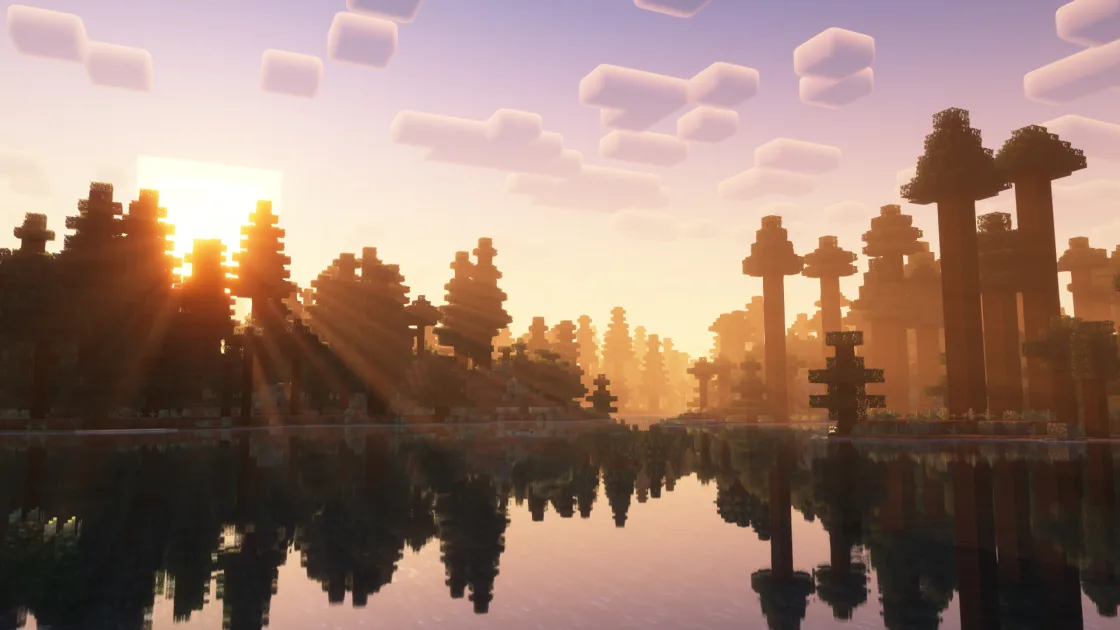
Discovering the Minecraft best shaders is the most transformative way to elevate Mojang's iconic sandbox into a visually breathtaking fantasy world. While Minecraft's blocky aesthetic has an undeniable nostalgic charm, modern shaders introduce volumetric god rays, crystalline water with realistic wave refraction, dynamic swaying foliage, and soft atmospheric shadows. However, running advanced lighting engines historically caused severe lag, world stutter, and unplayable frame rates on even high-end gaming computers.
Fortunately, the modern Minecraft modding community has undergone a massive technological shift. The legacy OptiFine framework has largely been superseded by the open-source Sodium and Iris Shaders ecosystem. Built specifically for modern multi-core processors and contemporary graphics cards, this modern rendering pipeline allows players to run stunning shader packs while maintaining 90+ FPS on mid-range hardware. In this comprehensive guide, we rank the Minecraft best shaders, compare their performance profiles in a detailed table, analyze the Complementary Reimagined versus Unbound debate, and provide a streamlined step-by-step setup guide.
Why Modern Minecraft Shaders Require Sodium and Iris
To understand why the modding community has overwhelmingly embraced the Sodium and Iris stack, it helps to examine how the original Java rendering pipeline operates. Vanilla Minecraft was built on legacy OpenGL 1.1 render commands. When rendering complex worlds, the game pushes millions of individual block faces through the CPU, creating massive draw call bottlenecks that starve the graphics card.
Key Architectural Strengths of the Sodium & Iris Pipeline:
- Modern OpenGL Multi-Draw Pipelines: Sodium completely rewrites Minecraft's world rendering engine. Instead of processing blocks individually, it batches entire chunks into GPU memory, drastically reducing CPU bottlenecks and enabling true hardware acceleration.
- Aggressive Face Culling: Block faces that are completely obscured behind opaque terrain or buried deep subterranean underground are instantly culled before the GPU ever spends compute cycles processing them.
- Smooth Memory Allocation: Sodium stabilizes Java memory allocation, virtually eliminating the notorious 10-second micro-freezes common during rapid world exploration.
- Instant Shader Hot-Swapping: With Iris, players can toggle shader packs on and off or adjust granular shader settings instantly with an in-game hotkey, eliminating the need to freeze the client or reload the world.
Top 5 Minecraft Shader Packs Ranked for Visuals & Performance
1. Complementary Shaders (Reimagined & Unbound)
Developed by EminGT, Complementary Shaders is widely celebrated as the gold standard of modern Minecraft visual enhancements. It is meticulously optimized to deliver exceptional visual fidelity with virtually zero graphical glitches across thousands of modded blocks. It comes in two distinct editions tailored to different player preferences:
- Complementary Reimagined: Preserves the authentic cubic charm of Minecraft while adding pristine god rays, soft ambient occlusion, crystalline water, and beautiful biome-specific auroras.
- Complementary Unbound: Leans into AAA cinematic realism, featuring 3D animated water waves, detailed specular mapping, wet surfaces during rainstorms, and real-time ore illumination in caves.
Hardware Profile: Smooth 80-110 FPS on GTX 1660 / RX 580 or better.
2. BSL Shaders
Created by Capt Tatsu, BSL Shaders has long been a favorite among architectural builders, streamers, and content creators. It is renowned for its warm, dreamy, and cinematic color palette. BSL features customizable depth of field, subtle bloom, volumetric clouds, and natural ambient occlusion. Water surfaces are clean and transparent with gentle, natural wave physics, creating an inviting visual atmosphere that feels cozy without becoming overwhelming.
Hardware Profile: Solid 70-95 FPS on GTX 1660 Super / RTX 2060.
3. Sildur's Vibrant Shaders
Sildur's Vibrant Shaders is legendary for its extreme hardware scalability. Offering presets spanning Lite, Medium, High, and Extreme-Volumetric Lighting, Sildur's allows players on budget laptops with integrated Intel Iris Xe or AMD Vega graphics to enjoy dynamic lighting at a smooth 60 FPS. It delivers intense sun flares, vibrant sunsets, and eye-popping color saturation that breathes life into dull biomes.
Hardware Profile: Highly adaptable; runs from 45 FPS on integrated graphics up to 120+ FPS on modern dedicated GPUs.
4. SEUS PTGI (Path-Traced Global Illumination) & SEUS Renewed
Crafted by Sonic Ether, SEUS PTGI introduced software-based ray tracing to Minecraft without requiring dedicated hardware ray-tracing cores. Light bounces realistically off interior walls, torchlight illuminates dark hallways with soft natural falloff, and glossy surfaces reflect surrounding geometry with uncanny optical accuracy. It remains the premier choice for showcase screenshots, architectural walkthroughs, and high-end aesthetic builds.
Hardware Profile: Demanding; recommended for RTX 3070 / RX 6800 or higher.
5. MakeUp Ultra Fast
If your primary goal is maximizing frame rates on an older laptop, budget graphics card, or handheld device like the Steam Deck, MakeUp Ultra Fast is the undisputed champion. Every visual component can be toggled individually, allowing you to selectively disable demanding features like depth of field or volumetric fog while keeping essential dynamic shadows and waving water intact.
Hardware Profile: Ultra High (120+ FPS on budget dedicated hardware; 60+ FPS on integrated chips).
Comprehensive Shaders Comparison & Benchmark Matrix
The table below summarizes the core features, hardware requirements, and visual strengths of the top shader solutions:
| Shader Pack Name | Visual Aesthetic | Performance Tier | Water Physics | Dynamic Shadows | Minimum GPU | Best Use Case |
|---|---|---|---|---|---|---|
| Complementary Reimagined | Stylized Vanilla Enhanced | High (90+ FPS) | Crystal-clear, biome-tinted | Exceptional volumetric beams | GTX 1060 / RX 580 | Everyday survival and large modpacks |
| Complementary Unbound | Cinematic Photorealism | Moderate (75-100 FPS) | Dynamic 3D wave mesh | Full specular and wet surfaces | GTX 1660 Super | Content creation and cinematic builders |
| BSL Shaders | Warm Cinematic Fantasy | Moderate (65-85 FPS) | Soft ripples and transparency | Warm bloom and soft shadows | GTX 1660 / RTX 2060 | Aesthetic builds and cozy survival |
| Sildur's Vibrant (High) | Saturated and Vivid | High (80-110 FPS) | Deep blue, gentle waves | Bright sunbursts and flares | GTX 1050 Ti | Adventure maps and colorful worlds |
| SEUS PTGI HRR | Ray-Traced Path Tracing | Demanding (45-65 FPS) | Photorealistic water caustics | Real multi-bounce light | RTX 3070 / RX 6800 | Enthusiast showcase builds and screenshots |
| MakeUp Ultra Fast | Lightweight and Clean | Ultra High (120+ FPS) | Minimalist clean waves | Simplified shadow maps | Intel Iris Xe / AMD Vega | Low-end laptops and handheld devices |
Complementary Reimagined vs. Unbound: The In-Depth Dilemma
Choosing between the two editions of Complementary Shaders is one of the most common decisions facing modern Minecraft players. While both share the same stable code foundation, their visual philosophies are distinct:
Complementary Reimagined: The Purist's Choice
Reimagined is designed for players who love Minecraft's foundational blocky identity. Clouds remain voxelized cubic formations drifting gracefully across the skybox. Water is clean and transparent with gentle, subtle ripples that match the game's art style. Foliage waves smoothly without distorting block geometry. It is ideal for long-term survival playthroughs where extreme visual changes can feel fatiguing over hundreds of hours.
Complementary Unbound: The Cinematic Powerhouse
Unbound removes vanilla restrictions to create an experience reminiscent of modern AAA fantasy adventure games. Clouds are fully volumetric, soft, and catch authentic twilight color gradients as the sun dips below the horizon. Water features true 3D wave meshes and specular reflections that catch surrounding cliffs and trees. Rainstorms create glistening puddles on stone pathways with dripping water shaders. It is the premier choice for visual purists and cinematic videographers.
Distant Horizons: Achieving Infinite Render Distance with Shaders
Historically, setting your render distance beyond 24 chunks brought even top-tier gaming computers to an immediate crawl. The revolutionary Distant Horizons mod completely changes this by introducing Level of Detail (LOD) polygon rendering to Minecraft. Instead of rendering every individual block miles away, Distant Horizons constructs simplified geometric terrain meshes for distant mountains and oceans.
When paired with modern Iris Shaders builds that natively support Distant Horizons, you can explore worlds with a simulated 128 to 256 chunk render distance while maintaining 80+ FPS. Distant mountain peaks catch realistic twilight shadows, and coastlines vanish naturally into atmospheric fog, providing a sense of scale previously impossible in the game.
Step-by-Step Modern Installation: The Fabric + Sodium + Iris Stack
Installing modern shaders takes less than five minutes using the Fabric ecosystem:
- Install Fabric Loader: Download the official Fabric installer, select your target Minecraft version (e.g., 1.20.x or 1.21.x), and install the client profile.
- Download Core Performance Mods: Place Fabric API, Sodium, and Iris Shaders into your
.minecraft/modsfolder. - Add Essential Companion Boosters: Add Lithium (optimizes game physics and mob AI), FerriteCore (cuts RAM usage by 40%), and Entity Culling (stops rendering mobs hidden behind underground cave walls).
- Add Your Shader Packs: Download your chosen shader
.zipfile (e.g.,ComplementaryReimagined.zip). Launch Minecraft, open Options > Video Settings > Shader Packs, drop the zip file into the folder, select it, and click Apply.
Key Settings to Boost Shader FPS by 40%
Inside your shader pack configuration menu, small tweaks yield massive performance gains with virtually zero loss in visual beauty:
- Profile Preset: Shift the overall preset from Extreme down to High or Medium. This single change typically recovers 20 to 30 FPS.
- Shadow Map Resolution: Reduce shadow map resolution from 2048 to 1024. In Minecraft's blocky aesthetic, slightly softer shadow edges blend naturally with terrain textures while cutting GPU fill-rate demands.
- Render Scale: Keep this locked at 1.0x native resolution. Avoid 1.5x or 2.0x supersampling as it multiplies GPU workload exponentially.
- Volumetric Fog Quality: Lower the sample count on volumetric fog. Ray marching through dense fog layers heavily taxes graphics compute units.
- Real-Time Shadow Distance: Lower shadow rendering distance from 12 chunks down to 8 chunks. Shadows beyond 8 chunks are rarely noticeable during active survival gameplay, yet rendering them forces your GPU to calculate shadow maps across vast geometric landscapes.
Troubleshooting Common Shader Glitches and Visual Artifacts
When running complex shaders on modded Minecraft clients, visual anomalies can occasionally occur. Here is how to resolve the most common issues:
- White Screen or Solid Black World: This usually occurs when your graphics card driver is out of date or when an outdated shader pack is loaded on a newer game version. Update your GPU drivers from NVIDIA or AMD, and verify that your Iris version explicitly matches your Minecraft release.
- Flickering Textures (Z-Fighting): Z-fighting happens when multiple block models share identical coordinates. Open your Iris shader settings, locate the "Depth Buffer" or "Waving Elements" tab, and ensure "Depth Buffer Fix" is toggled to Enabled.
- Severe Micro-Stutter During World Generation: While Sodium handles rendering, chunk generation is CPU-bound. Install the Chunky mod to pre-generate your world boundaries before exploring, and allocate between 4GB and 6GB of system memory in your launcher settings.
Conclusion: Elevating Your Minecraft Experience
Finding the Minecraft best shaders transforms your world from a simple blocky sandbox into a breathtaking living environment. By pairing modern packs like Complementary Reimagined or BSL Shaders with the high-performance Sodium and Iris framework, you no longer have to compromise between jaw-dropping visual fidelity and butter-smooth framerates. Apply these optimizations, fine-tune your shadow distances, and experience your builds in an entirely new light.
Frequently Asked Questions
Can I run shaders on an integrated graphics chip (Intel HD / AMD APU)?
Yes. By pairing the Sodium and Iris engine with lightweight shader packs such as MakeUp Ultra Fast or Sildur's Vibrant Lite, modern integrated graphics chips like Intel Iris Xe or AMD Radeon 680M/780M can achieve 50 to 75 FPS at 1080p resolution.
Is Iris Shaders compatible with OptiFine resource packs?
Yes. Iris natively supports the majority of custom skyboxes, emissive textures, and connected textures through companion Fabric mods like Continuity and Entity Model Features (EMF), allowing you to enjoy OptiFine visual resource pack features within the superior Sodium performance framework.
How much RAM should I allocate to Minecraft for shaders?
For vanilla Minecraft with shaders and performance mods, allocate 4GB to 6GB of RAM in your launcher JVM arguments (e.g., -Xmx4G or -Xmx6G). Avoid allocating more than 8GB for lightly modded setups, as excessive Java heap sizes can cause garbage collection micro-stutter.
Do shaders increase GPU temperatures significantly?
Yes. Running shaders shifts Minecraft from being predominantly CPU-bound to heavily GPU-bound, utilizing 95% to 100% of your graphics card. Ensure your desktop or laptop has adequate ventilation and clean cooling fans to maintain stable thermal performance.
Can I toggle shaders on and off with a keyboard shortcut?
Yes. Iris includes a built-in keybind (default is K) that instantly toggles shaders on or off in real time without pausing the game or opening video menus.
Why are ores glowing in caves when using Complementary Shaders?
Complementary Shaders features built-in real-time emissive lighting. Blocks like Redstone Ore, Glowstone, Torches, and Lanterns emit actual ambient light that illuminates surrounding cave surfaces, enhancing exploration immersion.
What is the single best shader pack for everyday survival gameplay?
Complementary Reimagined is widely regarded as the best overall pack for survival. It strikes the perfect balance between preserving the classic Minecraft aesthetic, offering pristine water and lighting, and delivering rock-solid framerates with zero graphical bugs.